
Wireless Printing Made Simple with AirPrint
Overview
AirPrint is a built-in printing solution designed for Apple users who want to print documents, photos, and web pages directly from their iPhone, iPad, or Mac devices. The software enables seamless wireless printing without the need for additional drivers or complex setup procedures. It works by connecting compatible Apple devices to the same network as a supported printer, allowing users to send print jobs instantly. This functionality is particularly useful for professionals, students, and home users who frequently need to print materials on the go.
The solution is ideal for environments where quick access to printing is essential, such as small offices, classrooms, or personal workspaces. By leveraging existing Wi-Fi networks, AirPrint eliminates the need for physical cables or third-party software in most cases. Users can initiate printing directly from apps like Mail, Safari, Photos, and Pages with just a few taps. While the developer is not specified in the provided information, AirPrint is known to be a native feature of Apple’s ecosystem, integrated into iOS and macOS operating systems.
Real-world use cases include printing school assignments from an iPad, sharing photos from an iPhone at home, or sending documents from a Mac during a remote meeting. The process requires only that the printer and device are connected to the same network. If a printer lacks native AirPrint support, users may need to install third-party software, though this is not part of the core AirPrint functionality.
Key Features & Capabilities
- Native AirPrint Support – Enables printing from iPhone, iPad, and Mac without installing additional drivers.
- Wireless Network Integration – Automatically detects compatible printers on the same Wi-Fi network.
- Multi-App Compatibility – Works with Mail, Safari, Photos, Pages, and other built-in Apple applications.
- One-Tap Printing – Users can start a print job with minimal interaction through the Share sheet.
- Automatic Layout Optimization – Adjusts document formatting to fit paper size and orientation automatically.
These features streamline the printing process, reducing setup time and minimizing user errors. For example, a student can print a research paper from Safari on an iPad by tapping the Share icon, selecting Print, and choosing the available printer. Similarly, a professional can send a presentation slide from Keynote to a compatible printer without transferring files. The system also supports color printing, duplex printing (if the printer supports it), and secure printing options when available. The workflow remains consistent across devices, ensuring a reliable experience for Apple users.
User Interface, Workflow & Performance
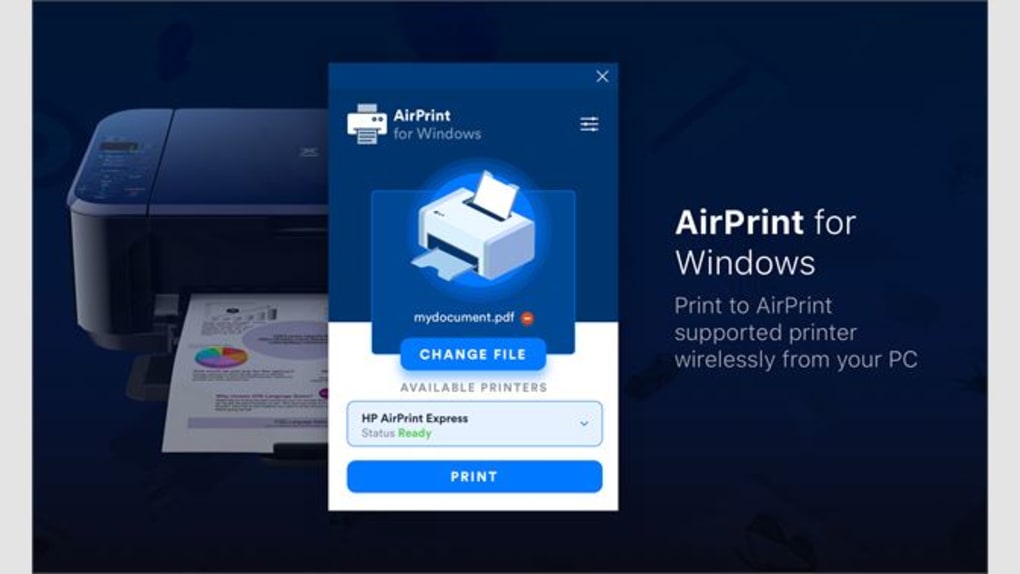
AirPrint operates through the standard print interface within Apple’s operating systems, which maintains a clean and intuitive design. Users access the feature via the Share sheet in supported apps, where the Print option appears alongside other sharing options. The interface is consistent across iOS and macOS, ensuring familiarity regardless of the device used.
Navigating the print settings is straightforward—users can select the printer, adjust page range, choose color or grayscale output, and set duplex printing if available. The workflow is optimized for speed and simplicity, with minimal steps required to complete a print job. No additional configuration is needed for printers that support AirPrint natively.
Performance observations are based on general software behavior patterns. The system leverages existing network infrastructure, so speed depends on Wi-Fi stability and printer responsiveness. The developer did not specify resource usage details. However, since AirPrint is a system-level feature, it typically consumes minimal CPU and RAM. Stability is maintained through Apple’s integrated architecture, which minimizes conflicts with other applications.
Compatibility & System Requirements
AirPrint is compatible with devices running iOS 4.2 or later and macOS 10.6 or later. It supports a wide range of printers from major manufacturers that have been certified for AirPrint functionality. The software is available on both Windows and Mac platforms, though it is primarily designed for Apple devices. The installation size is listed as 500 MB, which may include system components and support files.
Exact system requirements were not listed. However, users should ensure their printer is AirPrint-compatible and connected to the same Wi-Fi network as their Apple device. If a printer lacks native support, third-party software may be required to enable AirPrint functionality. Compatibility information is limited to the operating systems mentioned. No specific hardware requirements were provided.
Pros and Cons
Pros
- Seamless integration with Apple devices and operating systems
- Eliminates the need for printer drivers on Apple devices
- Fast and intuitive printing workflow with one-tap access
- Supports a wide range of apps and file types
- Free to use with no additional cost
Cons
- Requires a printer with native AirPrint support or third-party software
- Limited to Apple ecosystem; not available on non-Apple platforms
- Dependent on stable Wi-Fi connectivity
- Some advanced print settings may be restricted compared to traditional printing software
- Not available on Windows or Android without third-party tools
FAQ Section
Is AirPrint compatible with all printers?
AirPrint is only compatible with printers that have been certified for AirPrint support. If your printer does not list AirPrint as a feature, it may not work unless you use third-party software to enable the protocol.
Can I use AirPrint on Windows or Android devices?
AirPrint is a native feature of Apple’s ecosystem and is not directly available on Windows or Android. However, some third-party applications may allow limited AirPrint functionality on non-Apple devices.
Is AirPrint safe to use?
Yes, AirPrint uses the same network security protocols as the device’s Wi-Fi connection. Since it operates within Apple’s secure environment, there are no known security vulnerabilities associated with the standard implementation.
Do I need to update AirPrint regularly?
Updates to AirPrint are delivered automatically through iOS and macOS updates. Users do not need to manually install updates for the AirPrint feature.
Can I print without an internet connection?
AirPrint requires a local Wi-Fi network connection but does not need an internet connection. As long as the printer and Apple device are on the same local network, printing can proceed without an external internet link.
Final Thoughts
AirPrint delivers a reliable, user-friendly solution for wireless printing within the Apple ecosystem. Its seamless integration, ease of use, and zero cost make it a standout choice for iPhone, iPad, and Mac users. While it has limitations in terms of compatibility with non-AirPrint printers and non-Apple devices, its strengths far outweigh these constraints for its target audience.
Professionals, students, and home users who rely on Apple devices will find AirPrint indispensable for quick, hassle-free printing. The technology simplifies workflows and reduces dependency on cables and drivers. With its consistent performance and strong ecosystem support, AirPrint remains one of the most effective desktop printing tools available.
Download AirPrint now







